Tag: 4D vs RAD

  • 4D against other RAD Tools: Selecting the Right Platform in 2025

    4D against other RAD Tools: Selecting the Right Platform in 2025

    4D vs RAD Tools

    When teams evaluate Rapid Application Development (RAD) platforms, the question often comes down to this: should you build on 4D, or choose another RAD or low-code tool?

    In 2025, that decision carries more weight than ever. Development platforms are expected to support real-world scale, integrate cleanly with existing systems, and deliver long-term return, not just rapid prototypes. That’s why comparing 4D against other RAD tools has become a strategic conversation, not just a technical one.

    This article compares 4D with platforms like FileMaker, Microsoft Access, and modern low-code systems, focusing on architecture, integration, deployment, licensing, and overall ROI. The analysis is informed by real-world implementation experience from Wizmo, a provider of 4D evaluation and implementation services.

    While drag-and-drop development has been around for decades, today’s requirements demand more than speed alone—making platform fundamentals more important than ever.

    In 2025, RAD tools are expected to

    • Enable cloud-ready architectures.
    • Offer API and front-end integration options.
    • Support secure multi-user access.
    • Simplify cross-platform deployment.
    • Deliver measurable business agility.

    From FileMaker and Microsoft Access to Mendix and OutSystems, all of these tools promise speed and agility. Yet their separation of “prototype tools” from enterprise solutions lies in scalability and control. The discussion on 4D vs more than a comparison; it is a decision made strategically.

    Different RAD Tools vs 4D

    A Comparison Between 4D and Other RAD Tools

    1. Architecture and Performance

    When comparing 4D and FileMaker Access, the architecture makes a big difference.

    4D is more than simply a database with scripting—it is a full-stack development environment with a completely compiled language, an integrated database engine, and a web server.

    • FileMaker/Access: Good for small teams or single users, but not very scalable or fast.
    • Supporting multiple users in client-server, web and mobile environments, designed for native performance.

    The takeaway here is that 4D’s compiled code has better runtime performance, which means your application can support thousands and thousands of concurrent users, or as we say, is now enterprise-ready (the performance is a big factor why we say this).

    2. Integration and Extensibility

    The flexibility to integrate with your existing equipment is a key consideration.


    REST APIs, microservices, and data interoperability make modern business possible. 4D shines here with support for native REST APIs, a vast library of web components and seamless integration options for front-end frameworks such as React, Angular, and Vue.


    4D advantages 2025:


    • Direct REST API publishing.
    • JSON and OAuth 2.0 compatibility.
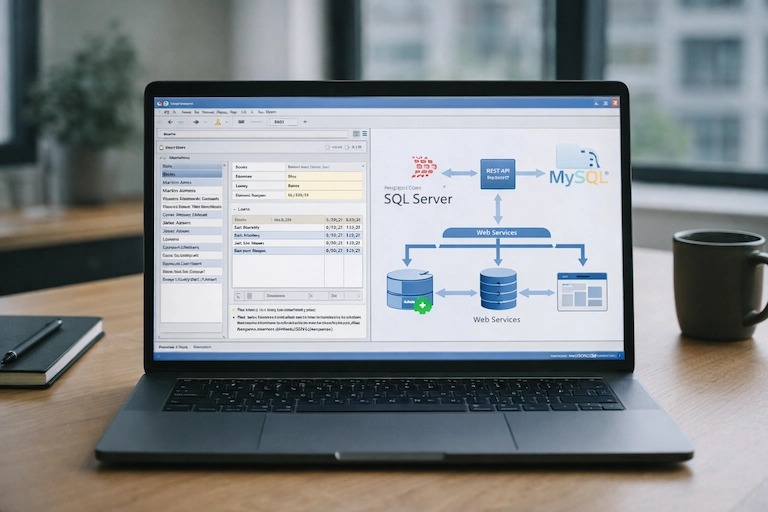
    • Close integration with external databases like MySQL, PostgreSQL and  SQL Server.
    • Simple connection with ERP, CRM, and analytics platforms.

    Up until now, competitors of 4D require middleware or paid connectors. This will increase long-term complexity and cost. With 4D, the integration stays native and efficient.

    3. Licensing Model and Cost Efficiency.

    Assessing 4D ROI, the licensing model becomes a key factor for firms


    4D is unique in offering flexible deployment-based licensing, unlike RAD systems that charge for every user of every app instance. This makes 4D suitable for small teams and large SaaS vendors.

    • Using Microsoft Access or FileMaker has a rapidly increasing license cost per user. 
    • Mendix and OutSystems charge according to applications or transaction volume.
    • Predictable and transparent cost structure for server and client licenses.

    This predictable licensing model gives 4D ROI a distinct advantage with enterprise-grade capabilities at a fair price.

    4. Speedy, stable, cloud-ready – advantages for 4D in 2025

    4D has matured significantly over the decades. The modernization developments that keep pace with the evolution of the industry are 2025.


    • 4D Write Pro and 4D View Pro for sophisticated interconnection of documents and spreadsheets.
    • Native 64-bit performance and multithreaded processing.
    • Responsive apps for Mobile and Web with 4D.
    • LIA “Language Integrated Architecture” 4D will let you use the same code on the backend as well as on the UI.
    • Cloud deployment support via Docker, Azure, and AWS.

    Simply put, 4D advantages 2025 make it ready for the future: bridging the speed of traditional RAD and the scalability of modern-day.

    5. Security and Compliance

    Security remains a defining metric in any 4D comparison.


    4D’s built-in SSL and TLS encryption, authentication frameworks, and role-based permission sets make it compliant with GDPR, SOC 2, and ISO certification standards.


    Although FileMaker and Access have some basic database-level encryption capabilities, they generally rely on other systems for end-to-end security. In contrast, 4D has these integrated natively to reduce complexity and risk.

    6. Deployment and Maintenance

    Is 4D better than FileMaker or Access? Is there something wrong with it?


    4D allows for builds for all platforms (Windows, macOS, Linux servers), deployment via Docker and load balancing, and container orchestration in the cloud.


    Access, like other tools, is at best hybrid, local, and with limited options to move to the cloud.
    Also, the scripting and compiled modes of 4D make automating versioning, testing, and CI/CD easy, which reduces long-term maintenance costs.

    What Makes 4D Unique?

    What sets 4D apart from other platforms is a common one.


    The answer lies in its all-in-one philosophy. 4D brings your database, API, and interface tools into one development environment instead of patching them together.


    Unique 4D features include:


    • Native database + programming + web engine in one.
    • Minimal external dependencies.
    • Full-stack control with customizable architecture.
    • Strong backward compatibility for legacy systems.
    • Cloud-native capabilities without vendor lock-in.

    4D allows quick accessibility while achieving large runs, giving designers the best of both worlds.

    4D ROI: How to Measure it
    SQL Servers vs 4D

    Return on investment isn’t just a licensing issue; it’s about total cost of ownership and development velocity.

    Organizations using 4D often report.

    • Deliveries are faster by 30 to 50% as compared to traditional stacks.
    • Lower maintenance costs due to integrated tooling.
    • Deployed apps will keep longer lifecycles because of fewer rewrites.
    • Reduced dependency on third-party tools.

    When calculating 4D ROI, don’t forget to factor in efficiency with one platform. Less integration means less chance for failure and more time to innovate.

    What Should You Choose in 2025 and Beyond?

    As RAD ecosystems evolve, it’s not a technical comparison of 4D vs other RAD tools but a strategic one. In 2025, 4D will become the fastest, best integrated and cheapest solution, with low-code simplicity and full-code power. 4D offers the power, flexibility, and ROI that developers and CIOs demand, whether you’re modernising existing systems or building next-gen cloud solutions.


    Partner with Wizmo to explore your best-fit platform path.

    Partnering with Wizmo for 4D Evaluation Consulting

    If you’re comparing 4D with FileMaker, Access, or modern low-code platforms, Wizmo can help you make the decision based on your workflows, integration needs, and deployment goals.


    We’ll review:

    • Integrations and data requirements
    • Licensing and ROI
    • Cloud/on-prem deployment options
    • Maintenance planning
    • Security and compliance

    Book a consultation to talk through your current environment and what you want to build next.

  • Creating Modern Interfaces with 4D Web Client Building

    Creating Modern Interfaces with 4D Web Client Building

    To keep up with the evolving digital ecosystem, it is now mandatory to build modern, responsive and high-performance web interfaces.

    The 4D web client is a good solution that sits between desktop power and web flexibility, which developers are looking for. It is a powerful platform for building dynamic, scalable, and visually rich user experiences.


    Of course, you can, if you have ever asked yourself, “Am I able to build a web client using 4D?” This doc will show you the steps to set up a web client using 4D, best practices for 4D responsive UI and demonstrate how 4D Web, REST APIs and the Web Component Library can help you create a modern, responsive and interactive app, backed with the Wizmo 4D web development services.

    What Is a 4D Web Client?

    A 4D web client is a browser interface that links users to a 4D database or application.  The 4D web clients provide access to your application from the web instead of a conventional desktop client. They are mobile-friendly, interactive and dynamic.


    The 4D Web platform provides developers with strong tools and technologies, including.


    • REST APIs for smooth data communication.
    • Libraries of Web Components for building modular and reusable UI components.
    • 4D LIA could interface with the advanced-level front-end.
    • Instruments for designing frames in a fluid manner.
    • Developers can use this to build applications that look great on desktops, tablets, and mobiles.
    What Is a 4D Web Client

    Why Build Web Clients in 4D?

    The 4D environment has progressed significantly from when it started as a database. Due to its modern web capabilities, it is ideal for organisations looking for applications that are flexible and connected.

    Key Benefits of Building a 4D Web Client

    • Get to market quicker with the fast design, test, and deploy process.
    • It is easy to use built-in REST APIs to connect to outward services and systems.
    • Responsive Design: The toolkit offers a 4D interface response with consistency in design.
    • Scalability: Manage everything from small dashboards to enterprise portals.


    By default, 4D offers robust authentication, encryption and access based on user role.

    Alongside, Wizmo offers 4D web development services that allow your team to connect with experts who can convert your 4D application to secure browser-based applications.

    How to Build a Web Client with 4D

    Many developers want to know how to create a web client with 4D. The roadmap below will help you build your own plan from scratch.


    • Determine How User Interact With the Application
    • Ensure that your core database and business logic are inside the 4D Server. Make particular functions available through 4D LIA for later use by your web client.
    • Understanding 4D LIA for Smarter Integration.

    The 4D LIA plays a vital part in linking your front-end and back-end logic. This enables developers to make methods and data structures directly available to the web layer without middleware. 

    It helps integrate the front-end much faster, cleaner and safer. By leveraging 4D LIA efficiently, 4D web client development can be more efficient, API overhead can be reduced, while maintaining a single source code that is easier to scale and debug.

    Turn on REST API Features

    Afterwards, set up 4D REST APIs to communicate between the front end and the back end. Example endpoints:

    • GET /rest/Customers.
    • POST /rest/Orders.

    These endpoints allow your 4D web client to exchange data dynamically and securely. Using a UI component library to assemble your front-end.

    Select a front-end framework, such as React, Vue, or Web Components. The 4D Web back end is REST-connected, while the UI interactivity is managed by the libraries.

    At Wizmo, the developers focus on integration at the front end, that is, connecting the 4D web client logic with modern frameworks to create seamless component-based user interfaces.

    Create an interface with four dimensions for responsiveness. 

    A 4D responsive interface means your layout will adapt to any screen. Make use of CSS frameworks such as Tailwind and Bootstrap


    Are you asking yourself how to make responsive UIs in 4D? Fluid grids, flexible media queries and reusable components that can accommodate any device.

    Improve Performance and SEO in Step 5.

    2025 must be optimised. As such, ensure your 4D web client adheres to these recommendations.

    • Cache frequent REST API responses.
    • Compress and minify CSS, JS, and images.
    • Use descriptive metadata and structured schema markup.
    • Check Accessibility using WCAG 2.2
    • Test your Core Web Vitals for speed and interactivity.

    Using these best practices for 4D responsive UI improves performance as well as SEO visibility and user engagement.

    Optimizing Your 4D Web Client for SEO and Performance

    In 2025, search algorithms will be ranked by experience, accessibility, and technicality. To help your 4D web client rank higher and perform better.

    Use schema markup so Google can read your site better and understand its content easily.

    • Use lazy loading for big media files so the page loads faster.
    • Monitor API latency to ensure fast data responses.
    • Make Sure to Secure Data with HTTPS and Modern Authentication.
    • Make sure integration doesn’t cause render or interactivity blocking.

    If you mix the performance tools of 4D with SEO of today, you can create a 4D web client that is very good both technically and visually.


    Best Practices for 4D Responsive UI: For a 4D responsive interface, a design should be adaptable, speedy, and reachable.

    The Best Design Principles are Given Below for 2025

    • UI block development in a component-first approach.
    • When designing a product or service, think about mobile first and the desktop later. 
    • Dynamic Data Loading: Fetch what you need by using REST APIs.
    • In-the-moment username feedback (e.g., loading, available, error states)
    • Ensure compliance with WCAG 2.2 and ARIA roles.

    Wizmo’s 4D web development services are based on these best practices that help us build every 4D web client to perform well on any device.

    Integrating REST APIs in Your 4D Web Client: 


    • The data communication inside any 4D web client is managed through REST APIs. They make it easy to: Retrieve, update, or delete records in real time.
    • Sync information with other systems like payment gateways or CRMs.
    • Maintain consistency across web, desktop, and mobile apps.
    • If the front-end integration is well made, the user experience will seem fast, seamless, and reliable, regardless of how complex the back end might be.


    Future-Proofing Your 4D Web Development with Wizmo.


    4D stays in tandem with the web evolution at a faster-than-ever pace, which includes REST API and a developer ecosystem with the latest technologies. No matter if you’re making a client portal, an internal dashboard, or a full-blown SaaS app, the 4D web client will offer the flexibility, scalability, and longevity to help you look further into the future.

    • Wizmo’s 4D web development team creates your project on a long-lasting foundation to prepare for the future. 
    • Wizmo helps to create a modern, secure, and reliable solution that scales with your business, from system architecture to deployment and performance optimization.

    Check out Wizmo’s 4D Web Development Services if you want to develop your 4D app for the web. Partner with a team that knows what makes a fantastic experience exciting and functional.